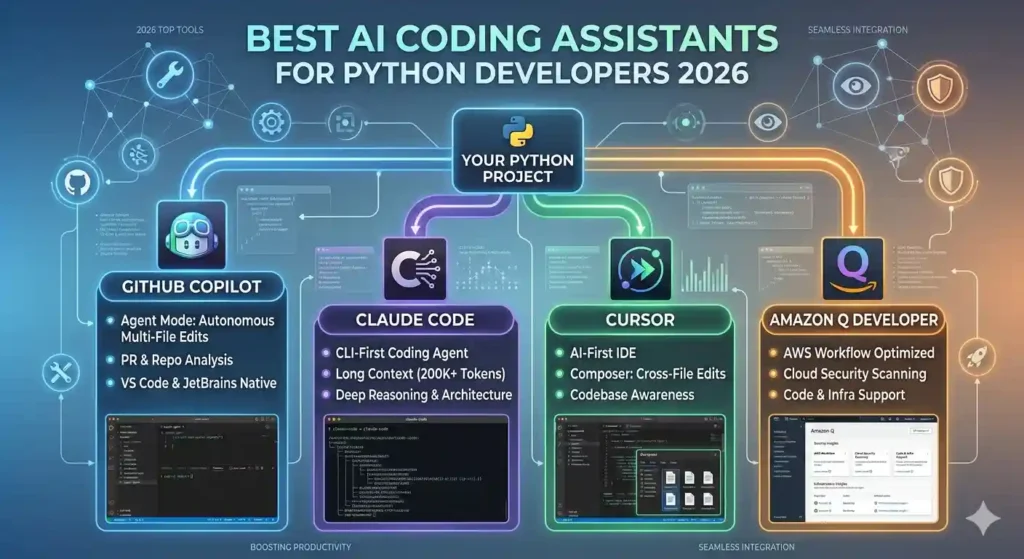
78% of developers now use AI coding tools to enhance their workflow — and that number is still climbing. If you write Python for a living (or even for fun), the right AI coding assistant for Python isn’t a luxury anymore — it’s the difference between shipping in days versus weeks. But with dozens of tools flooding the market, which ones actually move the needle?
This guide cuts through the noise. We researched and tested the top AI coding assistants specifically through a Python lens — evaluating code accuracy, multi-file reasoning, framework support, IDE integration, privacy, and real-world developer productivity. Whether you build FastAPI backends, crunch data with Pandas, train machine learning models, or script AWS Lambda functions, you will find the right tool here.
Python’s role in AI and data-heavy applications continues to grow — and if you’re building anything that involves storing or querying AI-generated vectors, be sure to check out our guide on vector databases for AI apps for the full picture on the infrastructure side of the stack.
By the end, you’ll know exactly which assistant fits your workflow, your budget, and your team — and which ones are all hype.
Why Python Developers Need a Specialized AI Coding Assistant
The Python Productivity Gap
Python’s flexibility is its superpower — and its trap. The same language that powers a two-line web scraper also runs billion-parameter neural networks. That breadth means developers constantly context-switch between frameworks: Django, FastAPI, NumPy, PyTorch, LangChain, Boto3. A generic code assistant trained on all languages equally can’t serve those needs as well as one with deep Python understanding.
The productivity data backs this up. Recent surveys show developers using AI assistants report up to 50% reductions in time spent on repetitive coding tasks. That figure drops sharply when the tool struggles with Python-specific patterns like decorators, type hints, async generators, or dataclass structures.
What Makes an AI Assistant Python-First
Not all AI coding tools are equal when it comes to Python. The markers of a genuinely Python-optimized assistant include:
- Deep framework awareness: Knows Django ORM patterns, FastAPI dependency injection, and Pandas chaining idioms
- Virtual environment awareness: Understands pip, Poetry, conda, and pyproject.toml structures
- Type hint support: Generates accurate PEP 484 annotations and understands mypy constraints
- Test generation: Writes meaningful pytest cases, not just placeholder functions
- Debugging intelligence: Reads tracebacks and suggests root-cause fixes, not surface-level patches
The 7 Best AI Coding Assistants for Python Developers in 2026
Here is a quick comparison of the top tools before we dive into the details:
Tool | Pricing | Python Strength | Best For | Verdict |
|---|---|---|---|---|
GitHub Copilot | $10/mo (Ind.) $19/mo (Biz) | Excellent — broad training data | GitHub-heavy teams, general use | Best Overall |
Cursor | $19/mo Pro | Excellent — multi-file, agents | Complex projects, refactoring | Best for Power Users |
Tabnine | Free / $12/mo | Strong — privacy-first local model | Enterprise, privacy-conscious devs | Best for Privacy |
Windsurf (Codeium) | Free / $15/mo+ | Very Good — 70+ languages | Beginners & full-stack devs | Best Free Option |
Claude Code | API usage-based | Excellent — reasoning & refactor | Complex debugging, architecture | Best for Deep Reasoning |
Amazon Q Developer | Free / $19/mo | Good — AWS-cloud integrated | AWS-native teams | Best for AWS Stacks |
Gemini Code Assist | Free (generous limits) | Very Good — GCP integration | Google Cloud developers | Best for GCP Teams |
Pricing as of Q1 2026. Free tiers and business plans vary — always verify on the vendor’s pricing page.
1. GitHub Copilot — Best Overall
GitHub Copilot has earned its best-overall status through sheer reliability. Powered by OpenAI’s models and trained on a massive corpus of public code, it delivers real-time inline suggestions that feel native to how Python developers actually think.
What separates Copilot in 2026 from its early iterations is context depth. It reads your open files, your recent edits, and even inline comments to generate suggestions that fit your specific codebase — not just generic patterns.
Key strengths for Python developers:
Exceptional boilerplate generation for Django models, REST endpoints, and data pipelines
Multi-file awareness reduces inconsistency across modules
Natural language to code via chat panel — describe a function, get production-ready Python
Tight GitHub integration makes PR creation, review, and issue summarisation seamless
Pricing: $10/month for individuals, $19/month for business, free for students and open-source maintainers.
Best for: Python developers already in the GitHub ecosystem who want a reliable, versatile assistant.
2. Cursor — Best for Power Users and Complex Projects
Cursor operates at a level above standard code completion. Built as a fork of VS Code with AI deeply embedded in its architecture, it treats your entire repository as context — not just the file you’re currently editing.
Cursor’s Composer mode is where Python power users find their edge. Describe a refactor in plain language — “add JWT authentication to all FastAPI routes” — and Cursor identifies every affected file, writes the logic, updates configuration, and suggests the correct pip installs. All in one operation.
Standout Python-specific features:
Agent mode that can fix bugs across multi-file Django or Flask projects autonomously
Cross-file refactoring with understanding of Python framework conventions
Dual-model review: generate with one model, verify with another to catch hallucinations early
Deep .cursorrules customisation for project-specific Python style guides
Pricing: Free tier available; Pro at $19/month.
Best for: Senior Python developers working on large codebases who need agentic, multi-file intelligence.
3. Tabnine — Best for Privacy-Conscious Teams
Tabnine stands apart with a foundational commitment to privacy. Its models are trained exclusively on ethically sourced, permissively licensed code. More importantly, it enforces zero data retention — your code never leaves your environment when using its local model option.
For regulated industries — fintech, healthcare, government — where code confidentiality is non-negotiable, Tabnine is the clear choice. It integrates with every major IDE and adapts its suggestions to your team’s coding patterns over time.
Local model option: runs entirely on your machine, zero cloud exposure
Team learning: model personalises to your team’s Python idioms and naming conventions
Ethically sourced training data eliminates copyright concerns in generated code
Pricing: Free tier; Pro at $12/month per user.
Best for: Enterprise teams, security-conscious developers, and regulated industries.
4. Windsurf (formerly Codeium) — Best Free Option
Windsurf (rebranded from Codeium) is the leading free-tier AI coding assistant in 2026. Its generous limits make it accessible to students, freelancers, and small teams who need serious capability without the subscription cost.
Windsurf’s Cascade agent is its most powerful feature — it anticipates your next step, predicts what changes are needed across files, and assists with complex codebase management. For Python, it supports over 70 languages and frameworks with strong context-awareness.
Free tier with high usage limits — genuinely useful, not crippled
Cascade agent mode for multi-file changes and codebase-level reasoning
Supports FastAPI, Django, Flask, NumPy, and all major Python frameworks out of the box
Integrates with VS Code and JetBrains with minimal setup
Pricing: Free; Pro plans from $15/month.
Best for: Beginners, freelancers, and full-stack developers who want powerful AI without paying upfront.
5. Claude Code — Best for Deep Reasoning and Refactoring
Claude Code is Anthropic’s agentic command-line coding tool built on Claude’s strong reasoning capabilities. Where other tools excel at code completion, Claude Code excels at understanding why code is structured the way it is — and how to improve it architecturally.
For Python developers tackling legacy codebases, complex debugging sessions, or architectural decisions, Claude Code’s ability to reason through multi-step problems is best-in-class. It can analyse an entire repo, identify structural issues, and propose refactors with clear reasoning behind each change.
Superior long-context understanding for large Python projects
Excellent at identifying root causes in deep tracebacks, not just surface-level fixes
Generates high-quality docstrings, type annotations, and full test coverage
Strong at explaining architectural tradeoffs — reasoning about code, not just writing it
Pricing: Usage-based via Anthropic API; also accessible through Claude.ai Pro plans.
Best for: Developers who need deep reasoning, architecture guidance, and high-quality refactoring.
6. Amazon Q Developer — Best for AWS-Native Python Stacks
Amazon Q Developer evolved from AWS CodeWhisperer and is the clear choice for Python developers building on Amazon Web Services. It integrates natively with AWS SDKs, understands Boto3 patterns, and can scaffold Lambda functions, CDK stacks, and CloudFormation templates with ease.
Its /dev, /doc, and /review agent modes handle multi-file feature implementation, documentation generation, and automated code review — all inside your IDE or CLI.
Native AWS service integration — Lambda, S3, DynamoDB, ECS patterns out of the box
Automated code review catches security vulnerabilities in Python before merge
CLI agent for terminal-based Python developers who prefer command-line workflows
Pricing: Free tier available; Professional at $19/month.
Best for: Python teams building on AWS infrastructure who want deep cloud-native intelligence.
7. Gemini Code Assist — Best for Google Cloud Developers
Gemini Code Assist is Google’s answer to Copilot, powered by the Gemini model family. Google has aggressively priced this tool — offering genuinely generous free limits for individual developers — to accelerate adoption.
Its differentiator is GCP-native intelligence: Cloud Functions, BigQuery SQL integration, Vertex AI workflows, and Cloud Shell support. For Python data scientists working in Colab or Cloud Workstations, it feels like a natural extension of the environment.
Free for individual developers with high monthly usage limits
Citation support — shows sources for generated code snippets for transparency
Deep Google Cloud and BigQuery integration for Python data and ML workflows
Pricing: Free for individuals; enterprise tiers with admin controls available.
Best for: Data scientists and Python developers embedded in the Google Cloud ecosystem.
How to Choose the Right AI Coding Assistant for Your Python Workflow
Match the Tool to Your Use Case
The biggest mistake developers make is choosing one tool and demanding it do everything. In 2026, the most productive Python teams use a layered approach: one tool for real-time completion, another for agentic tasks, and potentially a third for security and code review.
A practical decision framework:
- GitHub-heavy + general Python work: GitHub Copilot
- Large codebase refactoring + multi-file agents: Cursor
- Privacy-first enterprise environment: Tabnine
- Learning Python or budget-constrained: Windsurf (free tier)
- Complex architecture + deep debugging: Claude Code
- AWS-integrated Python stack: Amazon Q Developer
- Google Cloud + data science workflows: Gemini Code Assist
Free Tiers Worth Testing First
Before committing to a subscription, leverage free tiers. Windsurf, Tabnine, and Gemini Code Assist all offer meaningful free plans — not crippled demos. Install two or three and run them against a real project for a week. The tool that makes you forget it’s there (in a good way) is the one worth paying for.
Privacy and Data Retention Matter More Than You Think
Every AI coding assistant that sends your code to a cloud server exposes that code to a third party. For open-source projects, this is usually fine. For commercial codebases, proprietary algorithms, or regulated data, read the vendor’s data retention policy carefully before connecting any tool to your codebase. Tabnine and Windsurf both offer local-model options. GitHub Copilot for Business and Amazon Q Developer include enterprise-grade privacy agreements.
The GitHub Copilot privacy documentation outlines exactly what data is transmitted and retained — worth reading before rolling it out to a team.
5 Proven Tips for Getting More Out of AI Coding Assistants in Python
Write Better Prompts, Get Better Python
The quality of AI-generated code scales directly with the quality of your prompt. Vague function names produce vague completions. Specific, descriptive comments produce specific, useful code.
- Bad: # function to get data
- Good: # Fetches paginated user records from PostgreSQL, returns list[UserSchema], raises DatabaseError on failure
That difference in context can mean the gap between boilerplate scaffolding and production-ready code.
Use the Dual-Model Review Strategy
A hidden productivity drain in 2026 is misplaced trust. AI-generated Python can be syntactically correct but logically wrong — off-by-one errors, missing edge cases, silent type coercions. One high-impact strategy: generate code with one model, then ask a second model to review it specifically for logical errors, security risks, and edge cases. This approach catches hallucinations before they reach code review.
Automate Your Tests and Docstrings
Senior Python developers can spend up to 50% of their time on tests and documentation. AI assistants have a remarkably high success rate on these tasks for straightforward functions. Feed your completed function to your assistant with a prompt like:
“Write five Pytest cases for this function, including edge cases for null inputs, empty lists, large datasets, and boundary conditions.”
Then regenerate your docstrings in the same pass. The time savings compound across large codebases.
Keep Your Data Layer in Mind
AI coding assistants generate great application logic — but the data models and query patterns underneath still matter enormously. If you’re using MongoEngine as your ODM, head to the MongoEngine homepage to review the latest documentation. A well-structured schema and efficient query design will make any AI-generated code significantly more reliable in production.
For teams working on AI-native applications, the choice of vector storage also has a major impact on Python query performance. Our article on vector databases for AI apps walks through how to pick and integrate the right vector store alongside your Python stack.
Frequently Asked Questions
Which AI coding assistant is best for Python beginners?
Windsurf (free tier) and GitHub Copilot are the most beginner-friendly options. Windsurf removes the cost barrier entirely, while Copilot’s natural-language-to-code capability lets beginners describe what they want in plain English. Both integrate with VS Code with minimal configuration and provide helpful explanations alongside suggestions.
Can AI coding assistants replace Python developers?
No — and this is backed by how teams actually use these tools in 2026. AI assistants handle tedious work: boilerplate, documentation, repetitive patterns, and syntax checking. Developers focus on architecture, business logic, edge-case reasoning, and the judgment calls that require genuine understanding of a system. The developers being replaced are those who refuse to adapt their workflow, not those using AI tools.
Are AI coding assistants safe for proprietary Python codebases?
It depends on the tool and its configuration. Tabnine offers local models with zero data retention, making it safe for most proprietary code. GitHub Copilot for Business and Amazon Q Developer offer enterprise agreements with explicit code privacy guarantees. Always review the vendor’s data policy and consult your security team before connecting any AI tool to a proprietary codebase.
How much do AI coding assistants improve Python productivity?
Multiple 2025–2026 surveys converge on similar numbers: developers using AI coding assistants report 40–78% improvements in coding efficiency, with the biggest gains coming from reduced time on boilerplate, documentation, and test writing. The Stack Overflow Developer Survey consistently shows AI tool adoption accelerating year-over-year, with Python remaining the top language for AI-assisted development.
Do AI coding assistants understand Python-specific frameworks like Django or FastAPI?
GitHub Copilot, Cursor, and Claude Code have the strongest Python framework understanding in 2026. They can generate Django ORM queries, FastAPI dependency injection patterns, Pydantic models, and async Python idioms accurately. Windsurf and Gemini Code Assist are close behind. The weakest coverage tends to be in very new or niche Python libraries — in those cases, providing context in your prompt significantly improves output quality.
Conclusion
The landscape of AI coding assistants for Python developers has matured dramatically in 2026. These are no longer novelty autocomplete tools — they are productivity multipliers that fundamentally change how quickly and confidently you ship Python code.
Three takeaways to carry with you:
- Don’t choose one tool for everything. Layer your assistants — real-time completion for daily coding, an agent tool like Cursor or Claude Code for heavy refactoring, and a security-aware tool for pre-merge review.
- Start with free tiers. Windsurf and Gemini Code Assist offer genuinely powerful free plans. Test before you subscribe.
- Prompt quality matters. The more context and intent you give your AI assistant, the better the Python it produces. Invest 30 minutes in learning to prompt well and you’ll recoup it within your first week.
The Python developer who pairs deep language knowledge with the right AI toolchain ships faster, writes cleaner code, and avoids the burnout of repetitive work. Start with one tool from this list, commit to it for two weeks, and measure the difference. And if you’re building AI-native applications with MongoDB, don’t forget to explore the rest of the MongoEngine documentation — getting your data layer right is just as important as the AI tools on top of it.

Matt Ortiz is a software engineer and technical writer with 11 years of experience building data-intensive applications with Python and MongoDB. He spent six years at Rackspace engineering cloud-hosted database infrastructure, followed by three years at a New York-based fintech startup where he led backend architecture for a real-time transaction processing system built on MongoDB Atlas. Since joining the MongoEngine editorial team in 2025, Matt has expanded his focus to the broader AI developer stack — reviewing coding assistants, vector databases, LLM APIs, RAG frameworks, and image generation tools across hundreds of real-world test scenarios. His writing is read by engineers at companies ranging from early-stage startups to Fortune 500 technology teams. When a tool earns his recommendation, it’s because he’s used it in production.
Follow on Twitter: @mattortiz40